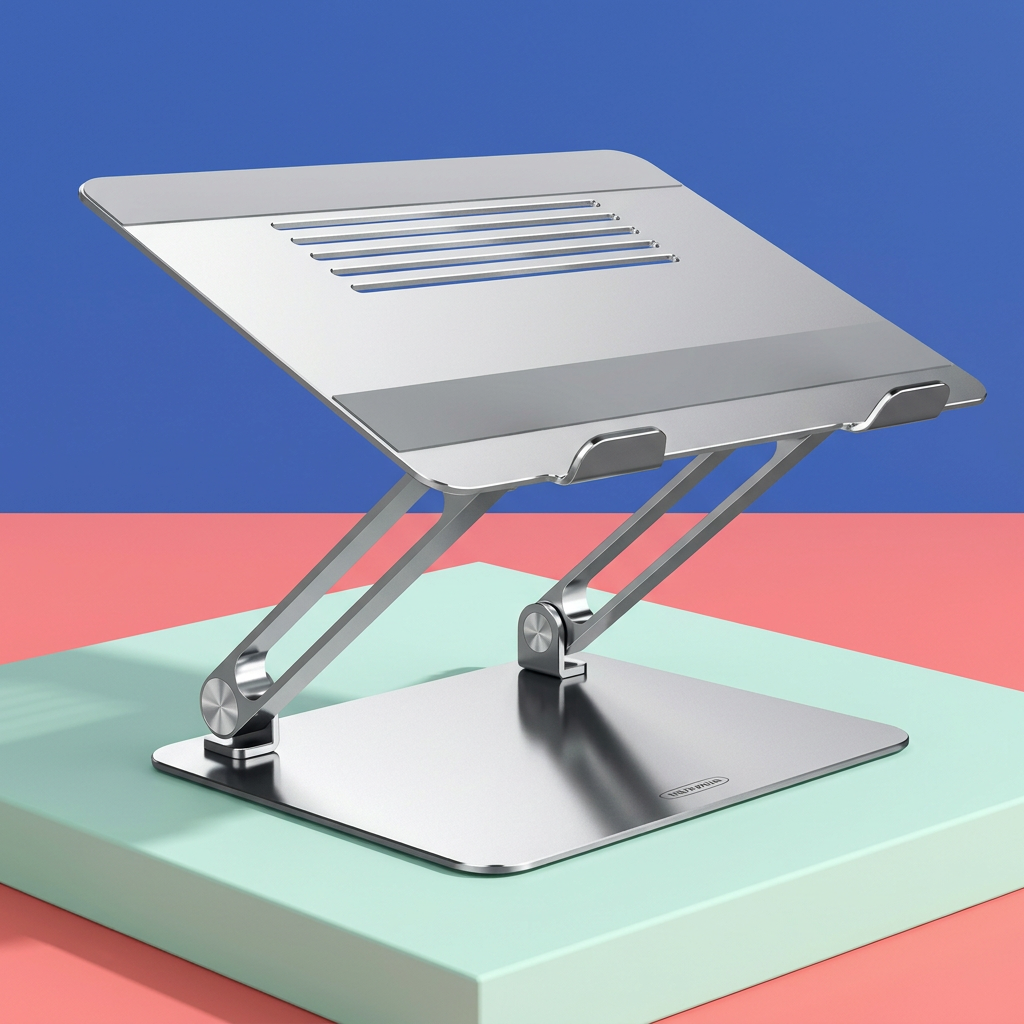
Nuvwllia Clear View Adjustable Aluminum Alloy Laptop Stand with Dual Articulated Arms, Vented Support Plate & Front Retaining Tabs in Silver
Nuvwllia Clear View Adjustable Aluminum Alloy Laptop Stand with Dual Articulated Arms, Vented Support Plate & Front Retaining Tabs in Silver
Couldn't load pickup availability

Nuvwllia Clear View Adjustable Aluminum Alloy Laptop Stand with Dual Articulated Arms, Vented Support Plate & Front Retaining Tabs in Silver
🖥 Rethink the Relationship Between Your Screen and Your Desk
Your laptop combines a display and keyboard in one device. Convenient when you are moving between places, less flexible when you want to arrange a dedicated desktop. Nuvwllia Clear View introduces another option: give a compatible laptop its own raised support, then organize the rest of the desk around the way you work.
This adjustable aluminum alloy laptop stand pairs a silver finish with a broad base, articulated support arms and an inclined upper plate. Parallel slots break up the platform, gray contact strips define the resting areas and two front tabs create a visible lower boundary. The design is functional in appearance without overwhelming the workspace.
It is not a whole new desk. It is one carefully chosen piece that changes how the pieces on your desk relate to one another.
Start with a Layout, Not a Pile of Accessories
The Display Zone
Position a compatible laptop securely on the support plate, within the actual stand's permitted size and weight limits. The adjustable structure lets you explore a different screen position from placing the computer directly on the desktop. Choose the position according to the product instructions and your seated setup rather than aiming for an arbitrary height.
The Input Zone
When the laptop is raised, a separate keyboard and mouse can remain on the desk. This separates their placement from the screen position, giving you more freedom to arrange the working area. Keep them within a comfortable reach, with sufficient space for your hands and a clear route for any cables.
The Thinking Zone
A notebook, reference page or tablet can sit elsewhere on the desk rather than competing with the laptop for the same spot. The benefit is not a promise of instant productivity. It is a clearer arrangement in which each object has a purpose and your current task is easier to identify.
⚙ Follow the Structure from Base to Platform
A Broad Foundation
The rectangular base gives the stand a defined footprint. Rounded corners soften its outline, while the silver surface visually connects it with the platform above. Place the full base on a firm, level desk and check stability before adding your device. A broad-looking base does not replace the need to follow the rated load and placement guidance.
Articulated Support Arms
The visible paired arms and circular pivot joints create the stand's adjustable geometry. Their angled lines give the support an open side profile rather than a solid block beneath the computer. Changes to the support position affect the overall setup, so make adjustments with the laptop removed and use only the positions permitted by the actual product.
An Inclined Upper Plate
The top platform provides a defined resting surface for a suitable device. Its rectangular shape and gently rounded corners echo the base, creating a coordinated silhouette. Before use, check that the laptop rests securely and that the selected setting remains stable with the device in place.
Parallel Openings Across the Surface
The slotted section introduces open space in the support plate. These openings form part of the platform design; they do not represent a powered cooling system. Align the laptop appropriately and keep its own ventilation openings unobstructed. No particular temperature reduction or performance improvement is promised.
Contact Strips and Front Tabs
Gray strips run across portions of the platform, separating the device's resting areas from the surrounding silver surface. Two raised tabs at the front mark the lower edge. Check their position against your laptop's thickness, underside shape and ports. They are not clamps and should not be treated as a way to secure a device during transport.
A Work Session with Fewer Improvised Supports
Imagine beginning a project with the laptop on its stand, a keyboard in front and a notebook to one side. You review the screen, turn to a handwritten outline, then return to the next paragraph. There is no stack of books beneath the computer to rearrange when you want to change the setup.
At the end of the session, disconnect cables as needed before moving equipment. Remove the laptop first, then reposition or adjust the stand according to its instructions. A considered workspace is as much about the reset afterward as the arrangement at the beginning.
The goal is a setup that suits the task, not a reason to stay in the same position all day. Take regular breaks and vary your activities.
🗂 A Silver Finish That Works Beyond One Desk Style
Colorful Home Office
Against teal, coral or lavender accessories, the silver stand offers a quieter visual center. Keep the brighter details in a small tray or notebook rather than spreading them across every surface. The open support profile lets the color of the room remain part of the scene.
Warm Wood Workspace
A silver stand creates a clean contrast against a warm wood-look desktop. Pair it with cream stationery and a restrained dark accent for a layered but uncluttered arrangement. The metal appearance adds distinction without requiring every accessory to match.
Minimal Study Corner
On a pale desk, the rounded platform and repeated silver surfaces feel coherent with a simple layout. Leave space around the base so the silhouette remains visible and cables are easy to check. A clear desktop should still be practical, with the items you actually use close by.
Fit Is More Than a Screen-Size Number
Before ordering, compare the verified stand specifications with your particular laptop. Screen diagonals alone do not establish whether a device will rest securely on the platform. Its overall footprint, weight, underside design and front edge all matter.
- Platform fit: Check the usable support area against the laptop's actual width and depth.
- Rated load: Use the manufacturer's stated capacity rather than judging strength from the photograph.
- Front-edge clearance: Confirm that the retaining tabs suit your device's thickness and do not interfere with use.
- Ventilation: Check that the laptop's own air openings remain unobstructed.
- Desk space: Allow room for the full base, an external keyboard if used and a safe cable route.
No universal laptop compatibility, specific screen-size range, maximum load, exact lift range or tilt angle is specified in this listing. Check those details for the actual unit before choosing your setup.
Adjust with Care. Use with Confidence.
Place the stand on a stable, level surface away from the edge of the desk. Remove the computer before making adjustments and keep fingers clear of the pivot joints. Follow the supplied guidance for positioning and any required tension or fastener checks.
Do not force the arms beyond their permitted movement or assume the base rotates. Keep cables from pulling on the laptop or catching in the joints. If the device shifts or the stand does not hold its position, stop using the setup until the cause has been resolved according to the manufacturer's instructions.
Clean using the method specified for the actual finish and contact strips. Avoid soaking the stand, and do not assume that abrasive cleaners are suitable for the metal surface. Inspect contact areas and joints periodically as directed by the product guidance.
Answering the Useful Questions
Does it include a fan?
No powered fan or active cooling system is represented. The visible slots are openings in the support plate.
Can it charge my laptop or act as a USB hub?
No charging, data ports or electronic hub features are described. This product is a laptop support stand.
Is it designed to rotate?
A swivel function is not confirmed from the reference design and is not promised here.
Will it correct my posture or relieve pain?
No medical or posture-correction guarantee is made. An appropriate workstation depends on the complete arrangement, your individual needs and how you use it.
What is included?
The listed product is one laptop stand. Laptops, keyboards, mice, notebooks and other accessories in lifestyle images are styling items and are not included.
Give Your Next Task a Clearer Starting Point
Nuvwllia Clear View brings an adjustable aluminum alloy support into the everyday desktop: a vented platform above, articulated arms between and a broad silver base below. Each part contributes to a straightforward visual language that suits a dedicated work or study space.
Check compatibility, arrange the desk around your needs, and let your laptop take its place in a setup that feels more deliberate.